Reflection Blog Post

Introduction:

The content I learned over this semester was very enjoyable and fun to utilize. This course was the only one this year that I thoroughly enjoyed and I hope it showed through my work.

Q: What was your favorite project(s) during the semester? Please explain why.

A: My favorite projects this semester by far were The final video project and the Final Illustrator Design. I loved the outcome of my Illustrator design because it turned out exactly how I wanted it and exceeded my own expectations. For the Video project, I enjoyed going out and shooting all the clips that I needed and watching as they all came together through editing. I would have loved to continue down this COM path but my circumstances have brought me elsewhere.

Q: What skills did you learn in the course that you believe you will use in the future?

A: Skills I learned this semester that I can use in the future would be the ability to use the main adobe products such as Premiere Pro, Photoshop, Illustrator, and Audition. I have already gotten used to using Sony Vegas Pro as a video editor but I feel like Premiere is much easier to use and manage, so i’ll be using that on future projects. I am also looking forward to using Illustrator for a business logo in the future!

Q: What coursework or career path do you see in your future? What skills or projects from this class may be influential in your chosen career path?

A: I would love to go into a video editing or commercial type field, but I currently do not see that as an option currently.

Q: Is there any skill that you wished you would have learned in this course that you did not learn? If yes, what skill is that?

A: No, if I had anything I didn’t know, I would just look it up on YouTube and I’d figure it out in like 5 min.

Q: Did you find any websites or resources from outside the class material that were especially useful?

A: Yes, YouTube was my friend this semester.

Conclusion:

This semester in COM210 was a very enjoyable one where I found fun in turning in assignments that I was proud of. If I could do over this semester, I would take this class again.
Final Video Project

In this project, I came across many adverse challenges ranging from needed equipment and finding the correct places to take shots in order to fulfill my desired outcome, but in the end, I believe it turned out just as good as I had imagined.

The Final Cut Of The Rough Draft

Introduction:

The original idea for my project was to make a video to the song “Old Town Road” By Lil Nas X. I thought it would be funny to dress up my roommate as some 2 cent cowboy and have him do stupid stuff around campus (which he was totally down for).

Our first challenge was getting all the props for the video. We went to Walmart and bought all the clothing needed but had to go to Goodwill to get a horse-on-a-stick prop. In the end we were able to get cowboy boots from one of my friends on campus.

Our second challenge was coming up with the script. My roommate and I bounced ideas off of each other for about 4 hours then spent another 2 hours dividing the time so that every scene fit. Original Script:

Horse skit

  • [10 sec] Opening scene is picture of Pullman but in 8 bit with title and blinking start button with retro 8 bit music. Ding is heard and start button stays lit as frame fades to black and the option “continue” appears. Another ding is heard and the game goes black.
  • Start with it fading into Thomas in a first person view walking towards the horse on a stick
  • [5 sec] Next scene opens to another dialogue screen saying “there is an old town road ahead, would you like to use a horse?”
  • Yes? <–
  • No?
  • [10 sec] Old town road starts playing. Thomas emerges from around a building in slow mo. Film him passing me down the road.
  • [5 sec] Get some close ups of what he is wearing
  • [10 sec] Show him entering the bottom floor elevator to the CUB then exiting the upper floor elevator into the CUB. (Or Vice Versa)
  • [5 sec] Show him heading for a hill in the sunset
  • [5 sec] Close up of him riding over the hill towards you
  • [5 sec] Enters a building with camera at his side/back
  • [5 sec] He finds a bottle that says water on a sticky note, and he drinks the water (With text “drink?” yes or no)
  • [15 sec] Zoom into his face while he pulls his sunglasses down then cut to the bottle with the sticky note on it, he peels the sticky not to reveal another sticky note below it that says “Pullman water”. Cut back to his eyes and narrow so you just see his eyes turn into a surprised expression. Fade to black
  • [20 sec] Instantly cut to him partying with his horse in slow-mo at Mike’s or a frat. Change Audio to live sound while Old Town Road plays At the club. Get some shots of people dancing with Thomas.
  • [10 sec] At the end cut from the dancing to black, back and forth to the beat of the music then cut to black and throw on some quick credits with maybe 3 seconds of bloopers.

Our third challenge came as how I was to incorporate this video to my course topic. I came up with the idea to make the video as if it was a video game itself. How I achieved this was by adding in 8-bit music and sound effects alongside animations I had to make on premiere pro. With the pixelated intro artwork and first person camera angles, it turned out beautifully.

Editing:

Once I had all my shots, it came crunch time. After about 10-12 hours of editing total, I came to my final rough draft video that I felt proud at. It ended up taking me so long due to having to completely restart 3 times because of some glitches in the video previews that wouldn’t allow me to edit the videos as I liked. I ended up coming up with the solution by having to convert every one of my videos from a MOV to an MP4 file.

Conclusion:

Now comes the largest downfall from this project: No copyrighted material. Throughout my entire design process I was very careful to use only songs and sounds from sources under a creative commons license. But the idea of making a video around the song “Old Town Road” was a mistake because it is indeed copyrighted content. My reasoning for using this song was that I didn’t think it was copyrighted and I didn’t find out until I uploaded the video to YouTube.

In the final draft, I was able to get a non copyrighted song so now my video should be perfect! I hope you enjoyed!

Bib for sounds under creative commons license:

Birds and walking

https://freesound.org/people/dobroide/sounds/22384/

Background intro song

https://www.playonloop.com

Sound effects

https://www.zapsplat.com/sound-effect-category/game-sounds/page/2/

Old Town Road Remix:


https://www.youtube.com/watch?v=j_F75fjZ8w4&list=LLo80zGVxdH0Ee5U_jbzeDHg&index=5&t=0s

Rough Draft Video

In this project, I came across many adverse challenges ranging from needed equipment and finding the correct places to take shots in order to fulfill my desired outcome, but in the end, I believe it turned out just as good as I had imagined.

The Final Cut Of The Rough Draft

Introduction:

The original idea for my project was to make a video to the song “Old Town Road” By Lil Nas X. I thought it would be funny to dress up my roommate as some 2 cent cowboy and have him do stupid stuff around campus (which he was totally down for).

Our first challenge was getting all the props for the video. We went to Walmart and bought all the clothing needed but had to go to Goodwill to get a horse-on-a-stick prop. In the end we were able to get cowboy boots from one of my friends on campus.

Our second challenge was coming up with the script. My roommate and I bounced ideas off of each other for about 4 hours then spent another 2 hours dividing the time so that every scene fit. Original Script:

Horse skit

  • [10 sec] Opening scene is picture of Pullman but in 8 bit with title and blinking start button with retro 8 bit music. Ding is heard and start button stays lit as frame fades to black and the option “continue” appears. Another ding is heard and the game goes black.
  • Start with it fading into Thomas in a first person view walking towards the horse on a stick
  • [5 sec] Next scene opens to another dialogue screen saying “there is an old town road ahead, would you like to use a horse?”
  • Yes? <–
  • No?
  • [10 sec] Old town road starts playing. Thomas emerges from around a building in slow mo. Film him passing me down the road.
  • [5 sec] Get some close ups of what he is wearing
  • [10 sec] Show him entering the bottom floor elevator to the CUB then exiting the upper floor elevator into the CUB. (Or Vice Versa)
  • [5 sec] Show him heading for a hill in the sunset
  • [5 sec] Close up of him riding over the hill towards you
  • [5 sec] Enters a building with camera at his side/back
  • [5 sec] He finds a bottle that says water on a sticky note, and he drinks the water (With text “drink?” yes or no)
  • [15 sec] Zoom into his face while he pulls his sunglasses down then cut to the bottle with the sticky note on it, he peels the sticky not to reveal another sticky note below it that says “Pullman water”. Cut back to his eyes and narrow so you just see his eyes turn into a surprised expression. Fade to black
  • [20 sec] Instantly cut to him partying with his horse in slow-mo at Mike’s or a frat. Change Audio to live sound while Old Town Road plays At the club. Get some shots of people dancing with Thomas.
  • [10 sec] At the end cut from the dancing to black, back and forth to the beat of the music then cut to black and throw on some quick credits with maybe 3 seconds of bloopers.

Our third challenge came as how I was to incorporate this video to my course topic. I came up with the idea to make the video as if it was a video game itself. How I achieved this was by adding in 8-bit music and sound effects alongside animations I had to make on premiere pro. With the pixelated intro artwork and first person camera angles, it turned out beautifully.

Editing:

Once I had all my shots, it came crunch time. After about 10-12 hours of editing total, I came to my final rough draft video that I felt proud at. It ended up taking me so long due to having to completely restart 3 times because of some glitches in the video previews that wouldn’t allow me to edit the videos as I liked. I ended up coming up with the solution by having to convert every one of my videos from a MOV to an MP4 file.

Conclusion:

Now comes the largest downfall from this project: No copyrighted material. Throughout my entire design process I was very careful to use only songs and sounds from sources under a creative commons license. But the idea of making a video around the song “Old Town Road” was a mistake because it is indeed copyrighted content. My reasoning for using this song was that I didn’t think it was copyrighted and I didn’t find out until I uploaded the video to YouTube.

I have taken some steps towards fixing this issue by contacting some developers of a free to use instrumental version of the song “Old Town Road”. I really hope you enjoy the video!

Bib for sounds under creative commons license:

Birds and walking

https://freesound.org/people/dobroide/sounds/22384/

Background intro song

https://www.playonloop.com

Sound effects

https://www.zapsplat.com/sound-effect-category/game-sounds/page/2/

Raw footage and Storyboard

Horse skit

  • [10 sec] Opening scene is picture of pullman but in 8 bit with title and blinking start button with retro 8 bit music. Ding is heard and start button stays lit as frame fades to black and the option “continue” appears. Another ding is heard and the game goes black.
  • Start with it fading into Thomas in a first person view walking towards the horse on a stick
  • [5 sec] Next scene opens to another dialogue screen saying “there is an old town road ahead, would you like to use a horse?”

Yes? <–

No?

  • [10 sec] Old town road starts playing. Thomas emerges from around a building in slow mo. Film him passing me down the road.
  • [5 sec] Get some close ups of what he is wearing
  • [10 sec] Show him entering the bottom floor elevator to the CUB then exiting the upper floor elevator into the CUB. (Or Vice Versa)
  • [5 sec] Show him heading for a hill in the sunset
  • [5 sec] Close up of him riding over the hill towards you
  • [5 sec] Enters a building with camera at his side/back
  • [5 sec] He finds a bottle that says water on a sticky note, and he drinks the water (With text “drink?” yes or no)
  • [15 sec] Zoom into his face while he pulls his sunglasses down then cut to the bottle with the sticky note on it, he peels the sticky not to reveal another sticky note below it that says “Pullman water”. Cut back to his eyes and narrow so you just see his eyes turn into a surprised expression. Fade to black
  • [20 sec] Instantly cut to him partying with his horse in slow-mo at Mike’s or a frat. Change Audio to live sound while Old Town Road plays At the club. Get some shots of people dancing with Thomas.
  • [10 sec] At the end cut from the dancing to black, back and forth to the beat of the music then cut to black and throw on some quick credits with maybe 3 seconds of bloopers.

Bib for sounds under creative commons liscense:

Birds and walking

https://freesound.org/people/dobroide/sounds/22384/

Background intro song

Sound effects

https://www.zapsplat.com/sound-effect-category/game-sounds/page/2/

Final Audition Story

Introduction:

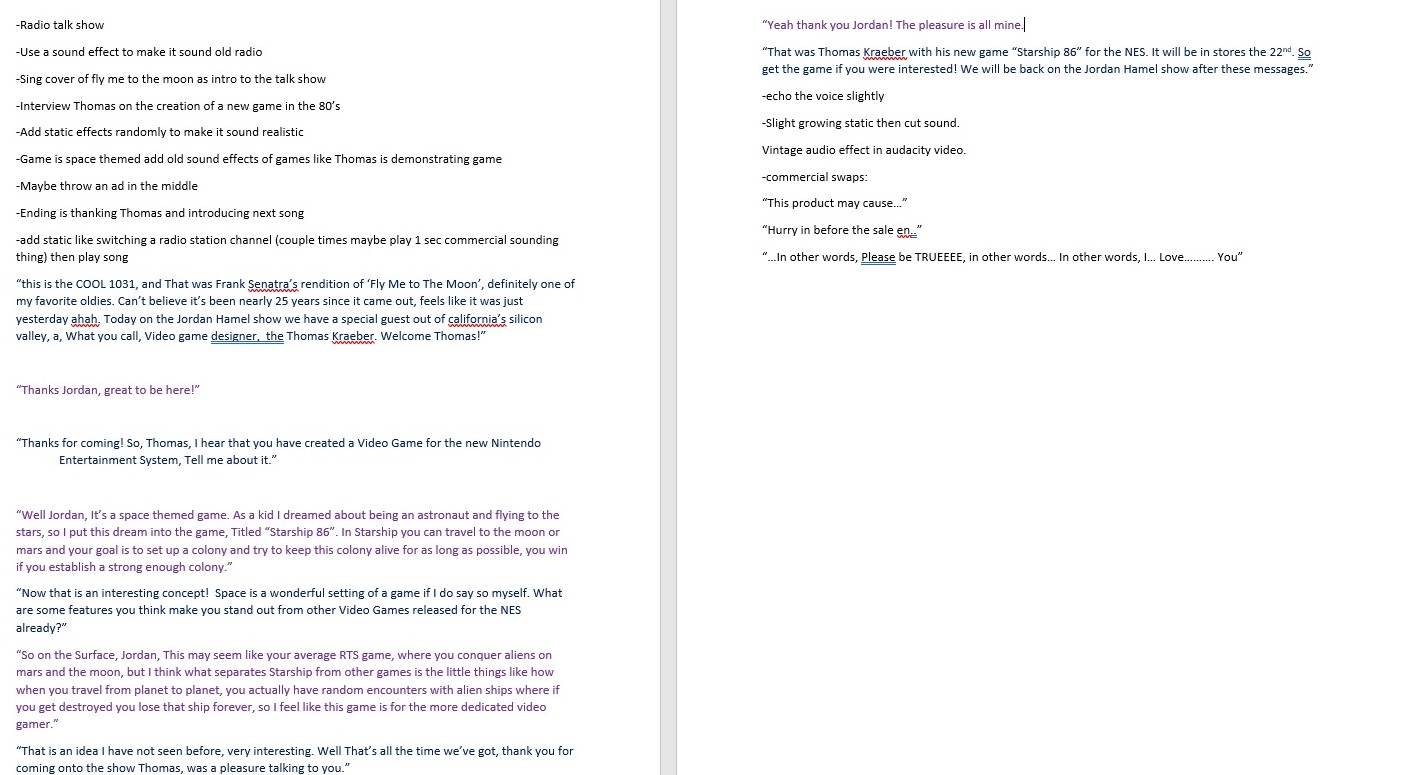
For this project, I decided to create a slightly satirical 1980’s – like radio talk show where I interview a man who created a new video game (to incorporate the project to my course topic). The person I interviewed was my roommate Thomas (we decided to keep our actual names). In the beginning of the audio I decided to add an effect that gave the feeling of someone changing the radio station until they ended up on my talk show. I came up with the idea while not being productive in my computer science lab and was able to write the entire script there.

How it happened:

My roommate and I recorded our lines when I got home from the lab. While recording, since I only have one microphone, we decided to record our lines separately. I would read my lines to him then he’d record his response. When he finished his lines I just read my lines separately. If you’d like to hear the lines before the editing, go here. For the static sound you hear, I used this YouTube video. And finally, for the music, I used a non-copyright instrumental of “Fly Me To The Moon” Frank Sinatra which I sang over. Since I was going for an old radio show sound, I went looking online and found this YouTube video which showed me how:

I messed around with the FFT filter until I was contempt with the sound of the audio. Building the audio took me the most time. I had to splice out every bit from each recording that I needed and combine them with spacing that would make the conversation sound natural. When I was finally done with the editing I ran into a problem that I don’t really know how to fix: the project is 30 seconds over the limit. Hopefully I can find a way to patch this up without altering the original idea of the project.

Rough Draft Audition story

After I got my feedback from the other students I realized a few things:

My rough draft was over the 2 minute limit, and that I could easily cut out parts that didn’t need to be in the story. I began to cut parts of the intro song I made because it did not make sense to have 10 seconds of singing when I was 34 seconds over the time limit. After that, I skimmed through my entire interview and cut snippets out of the draft to see if the story would make sense without them in it. After about 2 hours of editing, I came to my final draft. I hope you enjoy this 1980’s satirical radio sketch of an interview!

Starship 86 Final

Rough Draft Audition Story

For this project, I decided to create a slightly satirical 1980’s – like radio talk show where I interview a man who created a new video game (to incorporate the project to my course topic). The person I interviewed was my roommate Thomas (we decided to keep our actual names). In the beginning of the audio I decided to add an effect that gave the feeling of someone changing the radio station until they ended up on my talk show. I came up with the idea while not being productive in my computer science lab and was able to write the entire script there.

My roommate and I recorded our lines when I got home from the lab. While recording, since I only have one microphone, we decided to record our lines separately. I would read my lines to him then he’d record his response. When he finished his lines I just read my lines separately. If you’d like to hear the lines before the editing, go here. For the static sound you hear, I used this YouTube video. And finally, for the music, I used a non-copyright instrumental of “Fly Me To The Moon” Frank Sinatra which I sang over. Since I was going for an old radio show sound, I went looking online and found this YouTube video which showed me how:

I messed around with the FFT filter until I was contempt with the sound of the audio. Building the audio took me the most time. I had to splice out every bit from each recording that I needed and combine them with spacing that would make the conversation sound natural. When I was finally done with the editing I ran into a problem that I don’t really know how to fix: the project is 30 seconds over the limit. Hopefully I can find a way to patch this up without altering the original idea of the project.

Logo Final Design Project

My final design for my logo turned out greater than how I first imagined. From my sketch, to my rough draft, and finally to my final product, many changes and improvements came to be. My original idea stayed true to itself and to my topic while utilizing all the tools I learned from the original Illustrator tutorials as well as some tools I figured out myself along the way. After many hours put into this design, here is my final product:

My original Idea started off on the physical sketch. After much thinking of how I could incorporate a logo into my topic, I came to the conclusion of bringing the gaming groups together. As you may already know, gaming is split between console and PC. Each group believes they are better than the other. So my design was to bring them together. I decided to draw a controller for console gamers and a mouse for PC gamers, and also added a banner at the top reading “One Love” representing how we could come together under our love for gaming.

When I began my rough design, I started with the controller since I knew it would take the longest to create! After well over an hour, and using this image as a base (image below), I finally finished the design. Many of the features such as the ‘figure 8’ looking parts holding buttons and the joysticks took me the longest to figure out how to make. After 20 minutes of messing with tools, I finally came up with an actual working ‘figure 8’. The buttons were easy to create because they are just circles or squares! Same with the joysticks. My final rough product turned out fantastic in my eyes!

As for the mouse, it was very simple once I figured out how most of the tools work. I used this image as a base (image below).

My rough draft logo design was finally complete after adding the banner. When I finished, I realized that my scaling was off on many of my controller parts so I made some quick adjustments there. Here is my final rough draft logo design:

When it came time to start my final design, I knew I had to add color. Since I had spent so much time originally on my rough design, I was too tired to add color by the end of it. This was prominent as well when my peers reviewed it and criticized it in this way. Also, another thing that came up was the fact that the scroll wheel on the mouse brought a lot of attention away from other parts of the design, so I went on fixing that too.

After adding color to my design, there was a lot of empty white space, so I decided to add a background to the controller and mouse, trying to stay away from bright colors which would draw too much attention to it. Finally, I went onto adding gradients to parts of the design that I felt would have been hit by a light source. This took a decent amount of time because I had to add the different colors to the gradient that wouldn’t alter the original look of the design. After many color and angle changes to the gradient, I came to my final design. Here it is again:

I am very proud of this design and how I may use these tools in the future. I have already been able to use this knowledge to help create an app for my team at the Hackathon!